一、概述
从 API version 12 开始,在 @ComponentV2 装饰的自定义组件中支持使用 @Event 装饰器。@Param 标志着组件的输入,其装饰的变量在本地无法更改,而 @Event 标志着组件的输出。通过 @Event 装饰回调方法并调用,能够实现更改数据源的变量,再借助 @Local 的同步机制,将修改同步回 @Param 装饰的变量,以此达到主动更新 @Param 装饰变量的效果。
二、装饰器说明
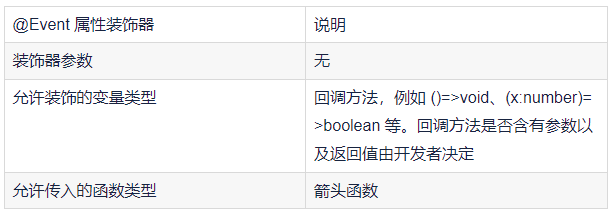
三、限制条件
组件类型限制:@Event 只能用在 @ComponentV2 装饰的自定义组件中。如果在非 @ComponentV2 装饰的组件中使用,如下面的示例代码,编译时会报错:
@Component
struct Index {
@Event changeFactory: ()=>void = ()=>{}; // 错误用法,编译时报错
}
变量类型限制:当装饰非方法类型的变量时,@Event 不会有任何作用,例如:
@ComponentV2
struct Index {
@Event changeFactory: ()=>void = ()=>{}; //正确用法
@Event message: string = "abcd"; // 错误用法,装饰非方法类型变量,@Event无作用
}
四、使用场景 - 更改父组件中变量
使用 @Event 可以更改父组件中变量,当该变量作为子组件 @Param 变量的数据源时,该变化会同步回子组件的 @Param 变量。示例代码如下:
@Entry
@ComponentV2
struct Index {
@Local title: string = "Titile One";
@Local fontColor: Color = Color.Red;
build() {
Column() {
Child({
title: this.title,
fontColor: this.fontColor,
changeFactory: (type: number) => {
if (type == 1) {
this.title = "Title One";
this.fontColor = Color.Red;
} else if (type == 2) {
this.title = "Title Two";
this.fontColor = Color.Green;
}
}
})
}
}
}
@ComponentV2
struct Child {
@Param title: string = '';
@Param fontColor: Color = Color.Black;
@Event changeFactory: (x: number) => void = (x: number) => {};
build() {
Column() {
Text(`${this.title}`)
.fontColor(this.fontColor)
Button("change to Title Two")
.onClick(() => {
this.changeFactory(2);
})
Button("change to Title One")
.onClick(() => {
this.changeFactory(1);
})
}
}
}
值得注意的是,使用 @Event 修改父组件的值是立刻生效的,但从父组件将变化同步回子组件的过程是异步的。即在调用完 @Event 的方法后,子组件内的值不会立刻变化。这是因为 @Event 将子组件值实际的变化能力交由父组件处理,在父组件实际决定如何处理后,将最终值在渲染之前同步回子组件。如下面示例:
@ComponentV2
struct Child {
@Param index: number = 0;
@Event changeIndex: (val: number) => void;
build() {
Column() {
Text(`Child index: ${this.index}`)
.onClick(() => {
this.changeIndex(20);
console.log(`after changeIndex ${this.index}`);
})
}
}
}
@Entry
@ComponentV2
struct Index {
@Local index: number = 0;
build() {
Column() {
Child({
index: this.index,
changeIndex: (val: number) => {
this.index = val;
console.log(`in changeIndex ${this.index}`);
}
})
}
}
}
在上述示例中,点击文字触发 @Event 函数事件改变子组件的值,打印出的日志为:
in changeIndex 20
after changeIndex 0
这表明在调用 changeIndex 之后,父组件中 index 的值已经变化,但子组件中的 index 值还没有同步变化。
综上所述,合理运用 @Event 装饰器能够实现组件间高效的数据交互和状态管理,在鸿蒙 Next 应用开发中发挥重
要作用。开发者在使用时需严格遵循相关规则和限制条件,以确保代码的正确性和稳定性。
